Moderne Dokumentenverarbeitung muss flexibel sein – denn jede Nutzerin und jeder Nutzer arbeitet anders. Mit den Benutzereinstellungen in DocBits passen Sie die Anwendung gezielt an Ihre persönlichen Anforderungen an und
enhancements designed to further streamline document processing and approval workflows. These updates give organizations greater control over their processes, improve accuracy in day-to-day operations, and provide a clearer, more intuitive user experience.
In this blog post, we take a closer look at what’s new and how these improvements support your daily work with DocBits.
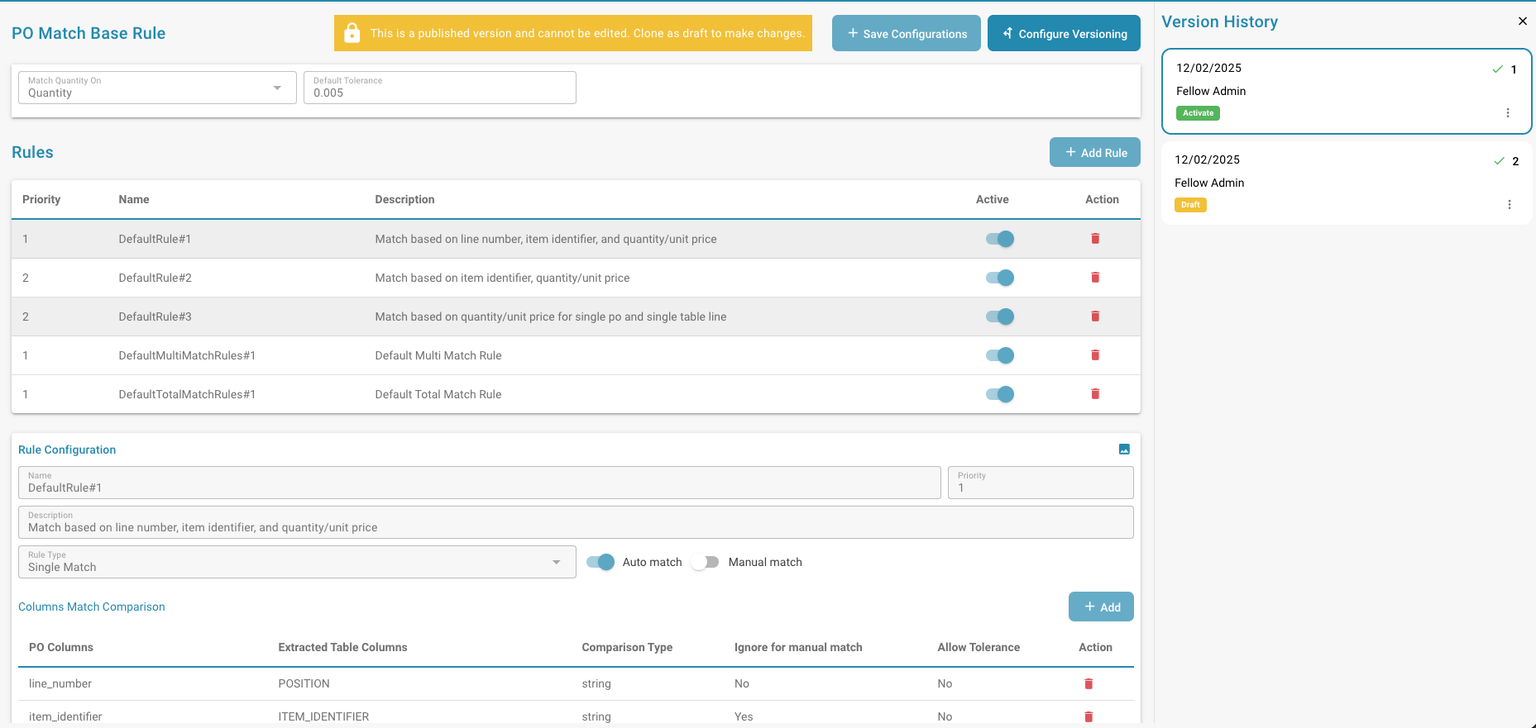
One of the most significant enhancements in this release focuses on purchase order matching. Organizations can now define in much greater detail which columns should be evaluated for each document type during the matching process. This allows purchase order matching rules to be tailored precisely to specific business requirements.
New capabilities include selecting relevant fields per document type, defining tolerances at the column level to handle minor deviations, and flexibly enabling rules for manual matching, automatic matching, or both.
Why does this matter? Purchase order matching is one of the most sensitive steps in invoice processing. Even small discrepancies can lead to delays. These new configuration options help reduce unnecessary exceptions while improving match accuracy and overall process quality.
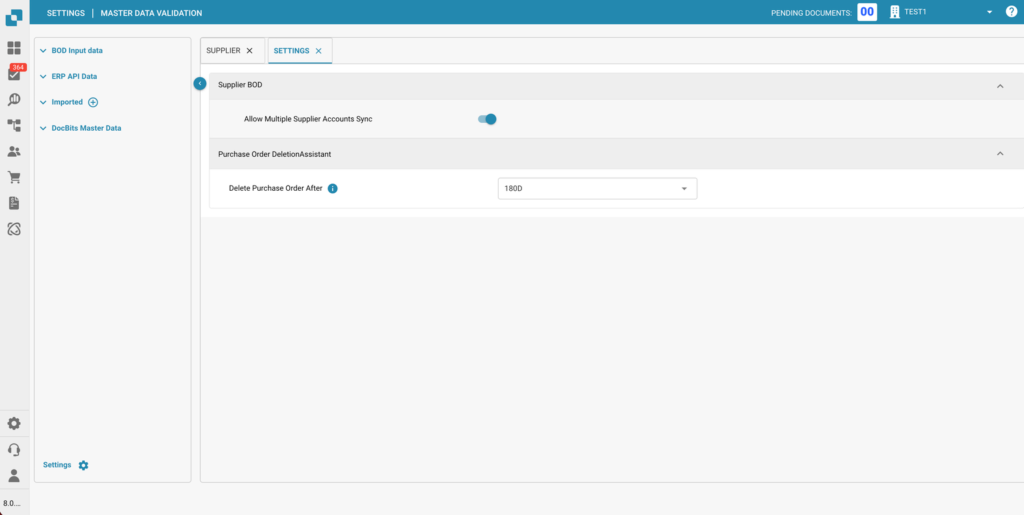
With this release, DocBits now supports multiple payment accounts per vendor, based on the Infor RemitToPartyMaster BOD. Organizations can maintain different remittance accounts for a single supplier and enable or disable this functionality centrally as needed.
This enhancement is particularly valuable for companies working with international vendors or complex supplier structures, where accurate payment handling is critical.
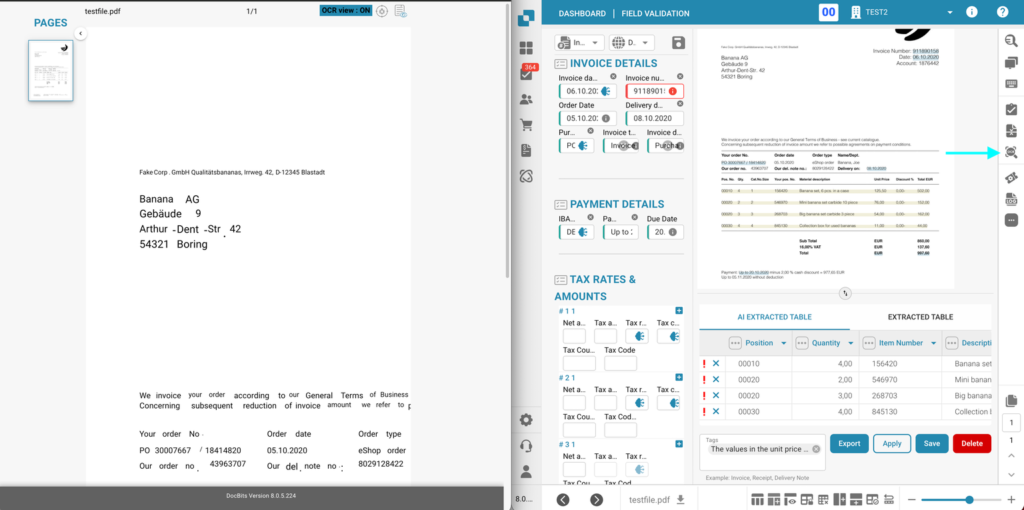
Transparency in OCR processing has also been improved. The OCR View is no longer limited to administrators and is now available to all users with validation access.
This enables faster verification of extracted data, shorter validation cycles, and better insight into overall OCR performance. As a result, quality assurance during validation becomes simpler, more efficient, and more reliable.
Approval screens have been optimized to display only the columns that are actually configured for comparison within each organization. Previously, unused or non-relevant columns could appear empty, creating unnecessary clutter.
With this update, approval views are cleaner and more focused, helping reviewers and approvers work more efficiently with less visual distraction.
The master data query has been extended to include a new “Order Type” field in the purchase order header. This addition enables improved categorization and analysis, especially in environments with complex or diverse purchasing processes.
Dashboards in DocBits are now even more user-friendly. Users who have been granted access to a shared dashboard can adjust and edit filters independently, without requiring additional administrator configuration.
This allows dashboards to be tailored to specific roles and responsibilities, transforming them into more interactive tools for data-driven decision-making.
To further enhance usability, administrators can now configure prefixes for approval columns directly in the layout editor and define them per document type.
This feature improves readability, supports faster orientation during the approval process, and is especially helpful for teams handling large volumes of documents.
The DocBits December 2025 release brings meaningful improvements across purchase order matching, OCR transparency, approval workflows, and dashboard flexibility. Together, these enhancements help organizations operate more efficiently, reduce errors, and maintain greater control over their document processes.
As always, DocBits continues to evolve based on real-world customer needs and practical experience. If you have any questions about the new features or need assistance, our team is always happy to help.

Moderne Dokumentenverarbeitung muss flexibel sein – denn jede Nutzerin und jeder Nutzer arbeitet anders. Mit den Benutzereinstellungen in DocBits passen Sie die Anwendung gezielt an Ihre persönlichen Anforderungen an und

Wer kennt es nicht? Dutzende Dokumente, unzählige Uploads, ständige Fragen nach dem Status von Dokumenten – und mittendrin das Gefühl, den Überblick zu verlieren. Genau hier setzt das DocBits-Dashboard an.

Even greater efficiency, control, and flexibility for your workflows Our latest update brings numerous improvements to the platform that will make your daily work noticeably easier. Whether you’re creating emails,

step by step Since January 2025, companies in the B2B sector are required to be able to receive electronic invoices. The obligation to issue e-invoices—meaning to send them out yourself—will

Marketing is constantly evolving—and with it, customer expectations. Mass emails and broad campaigns often no longer deliver the desired results. Companies are therefore looking for approaches that are more precise,
You are currently viewing a placeholder content from Vimeo. To access the actual content, click the button below. Please note that doing so will share data with third-party providers.
More InformationYou are currently viewing a placeholder content from YouTube. To access the actual content, click the button below. Please note that doing so will share data with third-party providers.
More InformationYou need to load content from reCAPTCHA to submit the form. Please note that doing so will share data with third-party providers.
More Information