DocBits User settings

Customize Your Workspace and Work More Efficiently

Modern document processing software should adapt to the people who use it — not the other way around. With DocBits User Settings, you can easily tailor the application to your personal preferences and daily workflows, improving efficiency, usability, and overall user experience.

In this article, we’ll show you how to make the most of the DocBits user and advanced settings and why personalization plays a key role in productive document processing.

Why user settings matter in Document Processing

In areas like automated invoice processing and intelligent document processing (IDP), clarity and ergonomics are essential. Individual user settings help to:

  • Reduce manual errors
  • Speed up daily workflows
  • Improve user adoption
  • Minimize fatigue during document validation

DocBits offers flexible customization options that are easy to configure — no technical setup required.

User Settings in DocBits: Quick Access, Full Control

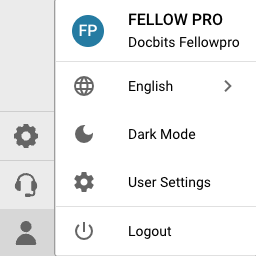
By clicking the user icon in the bottom-left corner of DocBits, you can access your personal settings at any time. From here, you can:

  • Switch between sub-organizations
  • Select your preferred language
  • Enable or disable Dark Mode
  • Open the advanced user settings
  • Securely log out of your account

After making changes, you can refresh the user settings to ensure all active configurations are displayed correctly.

Advanced User Settings for Maximum Efficiency

The Advanced User Settings allow you to fine-tune DocBits to match your working style:

  • Choose your preferred date format
  • Adjust amount and number formatting
  • Set your ideal font size for better readability
  • Enable Dual Monitor Mode for efficient document validation across multiple screens

You can also update your username and password directly within the advanced settings.

👉 Don’t forget to click Save after making any changes.

Watch How It Works 🎥

In our short video, we walk you through the DocBits User Settings step by step and show how easily you can customize the platform to support your daily work.

Conclusion: Small Settings, Big Impact

The DocBits User Settings are more than just convenience features. They are a core element of a modern, user-friendly document processing solution.

Customized settings mean:

  • Higher productivity
  • Fewer errors
  • A better user experience

That’s what DocBits is built for.

Image credits: Header- & featured image by  creativeart on Freepik

Share:

Feel free to follow us on LinkedIn​

Recent posts

track

Wer kennt es nicht? Dutzende Dokumente, unzählige Uploads, ständige Fragen nach dem Status von Dokumenten – und mittendrin das Gefühl, den Überblick zu verlieren. Genau
read more »
Release

More Precision, Transparency, and Flexibility in Document Management enhancements designed to further streamline document processing and approval workflows. These updates give organizations greater control over

read more »
Update

Even greater efficiency, control, and flexibility for your workflows Our latest update brings numerous improvements to the platform that will make your daily work noticeably

read more »
Xinvoice

step by step Since January 2025, companies in the B2B sector are required to be able to receive electronic invoices. The obligation to issue e-invoices—meaning

read more »
abm

Marketing is constantly evolving—and with it, customer expectations. Mass emails and broad campaigns often no longer deliver the desired results. Companies are therefore looking for

read more »

Feel free to follow us on LinkedIn